

Burr slitting muncul sebagai bibir yang terangkat, tepi berserabut, debu (dusting), atau untaian yang “tercabik” di sepanjang potongan—sering kali paling parah di satu sisi web. Hal ini tidak hanya terlihat buruk; tetapi juga memicu scrap (pangkasan tepi, reject), kemacetan di proses hilir, dan penghentian tidak terencana saat operator harus menyesuaikan pengaturan yang sedang berjalan.
Kabar baiknya: banyak lonjakan burr disebabkan oleh pergeseran pengaturan yang dapat Anda perbaiki langsung di lini produksi dalam waktu 15–30 menit—tanpa pembongkaran total. Solusi tercepat biasanya diperoleh dengan mengembalikan overlap dan clearance ke dalam rentang yang tepat, memulihkan kondisi tepi pisau, dan menstabilkan mekanika web (tegangan dan kecepatan).
Anda tidak memerlukan instrumen khusus untuk memulai. Sebagian besar pabrik sudah memiliki peralatan yang diperlukan: feeler gauge, dial indicator, film tekanan, dan termometer IR.
Catatan keselamatan: Panduan ini hanya untuk pemecahan masalah proses. Selalu ikuti prosedur lockout/tagout, pelindung mesin, dan prosedur OEM di lokasi Anda sebelum memeriksa atau menyesuaikan stasiun slitting apa pun.
Lakukan pemeriksaan di bawah ini dan Anda akan melihat tepi potongan yang lebih bersih, OEE yang lebih stabil, dan total biaya kepemilikan yang lebih rendah hari ini—karena Anda akan mengurangi scrap sekaligus waktu yang terbuang untuk “penyetelan berdasarkan perasaan”.”
Contoh publik (film/kemasan): Sebuah studi kasus Maxcess pada proses web polimer tipis melaporkan penghilangan kerutan dan melipatgandakan output rol setelah memasang solusi perataan web (web-spreading), membantu menstabilkan proses hilir termasuk slitting dan winding. Lihat Studi kasus Maxcess: Plitek menghilangkan kerutan dan melipatgandakan output rol (referensi publik; hasil bergantung pada desain lini dan material).
Solusi instan sekarang (burr slitting)
Atur overlap dan clearance
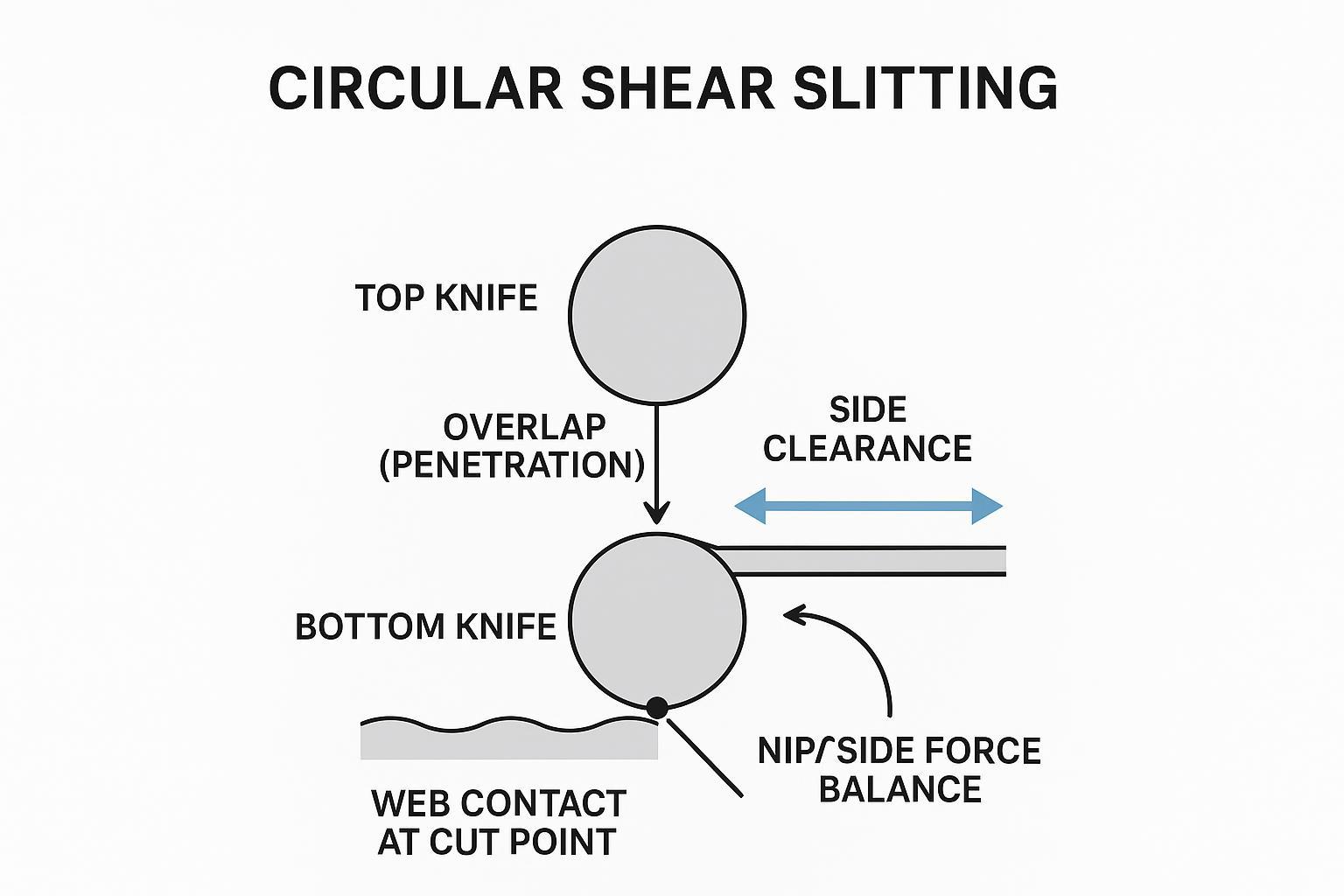
Jika burr tiba-tiba meningkat setelah changeover, anggap overlap dan clearance samping sebagai tersangka utama #1. Ini adalah langkah awal tercepat dalam pemecahan masalah circular shear slitting karena secara langsung menentukan apakah Anda melakukan pemotongan (shearing) atau gesekan (rubbing).
Arti dari “overlap” dan “clearance” (dalam satu kalimat): overlap adalah seberapa jauh pisau menembus melewati titik singgung teoritis; clearance adalah celah samping terkontrol yang memungkinkan pisau memotong (shear) alih-alih bergesekan (rub).
Mulailah dengan penghentian singkat dan lakukan pemeriksaan overlap dan clearance pisau slitter berikut:
- Konfirmasikan clearance samping pada titik potong (menggunakan feeler gauge). Periksa sisi operator dan sisi penggerak (drive side). Clearance yang terlalu longgar dapat membuat web berubah bentuk alih-alih terpotong; terlalu rapat akan meningkatkan gesekan dan dapat menyebabkan kerusakan tepi akibat panas.
- Atur ulang overlap dalam langkah-langkah kecil. Jika Anda melihat tepi berserabut dan debu (dusting), kurangi sedikit overlap. Jika hasil potongan terlihat robek atau sesekali tidak terpotong, tingkatkan sedikit overlap. Ubah satu variabel saja dalam satu waktu.
- Verifikasi keparalelan di seluruh lebar. Jika satu jalur bersih dan jalur lainnya ber-burr, pengaturannya mungkin sudah siku secara keseluruhan tetapi tidak konsisten di seluruh tumpukan arbor.
Poin Penting: Burr shear slitting yang seragam di semua jalur biasanya merujuk pada masalah overlap/clearance atau kondisi pisau; burr yang muncul dan hilang dalam pola yang berulang sering kali merujuk pada runout atau stabilitas tegangan (tension).
Untuk referensi lebih mendalam tentang logika clearance dan kesalahan umum, lihat panduan MAXTOR METAL: Panduan Definitif untuk Mengatur Clearance Pisau Geser.
Jika Anda sedang menyetel overlap/clearance setelah changeover—atau Anda sedang memasangkan pisau untuk mengurangi burr dan panas—lihat produk MAXTOR METAL pisau bulat dan bilah slitter untuk konfigurasi umum dan opsi kustomisasi.
Pulihkan ketajaman tepi dan hilangkan burr (deburr)
Pisau “baru” tidak secara otomatis menjadi pisau yang tajam pada tepi potongnya—terutama jika telah ditangani, terbentur, atau dirakit dengan spacer yang terkontaminasi.
Tindakan langsung di lini produksi yang bekerja cepat:
- Periksa adanya micro-chip dan roll ring. Gunakan alat pembesar jika tersedia; kerusakan tepi yang kecil dapat menghasilkan burr yang sangat besar pada film dan nonwoven.
- Bersihkan permukaan kontak dan spacer. Satu burr saja pada spacer atau kotoran yang terperangkap dapat memiringkan tumpukan pisau dan mengubah clearance aktual pada titik potong.
- Jika Anda tidak dapat langsung mengasah, kurangi bebannya. Turunkan sedikit kecepatan dan/atau tegangan (tension) untuk menghentikan robekan selagi Anda menjadwalkan pengasahan ulang.
Pantau suhu sebagai indikator gesekan. Jika termometer IR menunjukkan titik panas yang meningkat di sekitar pisau, Anda mungkin mengalami gesekan (terlalu rapat, gaya samping terlalu besar) atau memotong dengan tepi yang tumpul.
Lembar panduan cepat gejala tepi (pemeriksaan visual cepat):
- Pemotongan bersih (clean shear): tepi yang tajam, debu minimal, tampilan konsisten dari jalur ke jalur.
- Gesekan/gaya samping terlalu rapat: tepi yang mengkilap atau lumat, suhu pisau yang meningkat, terkadang tampak seperti “terpoles”.
- Robek (tindakan pemotongan tidak memadai): tepi kasar, serat/untaian tidak terpotong yang terputus-putus, burr yang memburuk saat tegangan berfluktuasi.
- Mikro-chip/tepi melipat (rolled edge): burr lokal yang “tercetak” berulang kali, sering kali disertai dengan pola cacat periodik dan suara detak/getaran (chatter) yang terdengar.
Sejajarkan jalur masuk, stabilkan tegangan (tension) dan kecepatan
Setelah overlap/clearance dan kondisi tepi berada dalam batas wajar, burr yang masih menetap sering kali merupakan masalah mekanika web.
- Posisikan web secara tegak lurus (siku) ke dalam stasiun. Sudut masuk yang miring dapat membiaskan gaya samping (side force) dan membuat salah satu tepi konsisten lebih buruk.
- Stabilkan tegangan (tension) sebelum Anda mengubah pengaturan pisau lagi. Perubahan tegangan dapat “memanipulasi” masalah clearance dengan mengubah posisi web pada titik potong.
- Kurangi kecepatan sejenak untuk mengisolasi penyebabnya. Jika burr berkurang dengan cepat dengan pengurangan kecepatan 10–20%, Anda kemungkinan menghadapi masalah stabilitas (flutter, respons loop tegangan, atau akumulasi panas).
- Periksa asumsi overspeed jika sistem Anda menggunakannya. Panduan industri umumnya merujuk pada overspeed pisau bawah yang kecil untuk mempertahankan aksi gunting (scissor action); lihat prinsip-prinsip yang dijelaskan dalam PDF Carolina Knife “Principles of Shear Splitting”.
Kit diagnosis cepat
Tabel SOP cepat: gejala → penyebab → pemeriksaan → solusi cepat → verifikasi
| Apa yang Anda lihat | Kemungkinan penyebab | Apa yang perlu diperiksa | Solusi cepat | Verifikasi hasilnya |
|---|---|---|---|---|
| Burr yang seragam di seluruh lajur (lane) | Overlap/clearance di luar jangkauan; tepi tumpul | Feeler gauge pada titik potong; tepi pisau di bawah pembesaran; kebersihan spacer | Atur ulang overlap/clearance secara bertahap; bersihkan spacer; kurangi beban (kecepatan/tegangan) jika diperlukan | Tepi tampak tajam; debu (dusting) berkurang; tren suhu pisau stabil |
| Burr sebagian besar berada di satu sisi | Masuknya miring; ketidakseimbangan beban samping (side load); susunan (stack) tidak sejajar | Kesikuan masuknya web; pola film tekanan; clearance antar-lajur | Siku-kan web; seimbangkan beban nip/samping; periksa kembali kesejajaran | Kesesuaian tepi kiri/kanan membaik |
| Burr berulang secara periodik di sepanjang web | Runout/TIR; kesalahan susunan (stack error); kontaminasi pada permukaan dudukan (mounting face) | Dial indicator TIR pada OD pisau; periksa permukaan dudukan (mounting faces) | Bersihkan permukaan; susun ulang; ganti spacer yang rusak; verifikasi kelurusan (alignment) | Pola menghilang; TIR berkurang |
| Tepi berserabut / serat tercabut | Sobek akibat aksi geser (shear action) yang rendah; tepi tumpul; tegangan tidak stabil | Overlap/clearance; stabilitas tegangan; kondisi tepi | Tingkatkan overlap sedikit; stabilkan tegangan; tajamkan/ganti jika gompal | Serabut berkurang; tepi hasil potong (slit edge) lebih stabil |
| Tepi mengkilap/tergesek (smeared) pada film | Gesekan/panas; clearance terlalu rapat; kotoran (debris) | Tren suhu IR; clearance; burr pada spacer | Buka clearance sedikit; bersihkan susunan (stack); kurangi gaya samping (side force) | Kenaikan suhu melambat; bekas gesekan (smear) menghilang |
(Selalu ikuti manual OEM Anda, prosedur keselamatan, dan batas desain holder sebelum melakukan penyesuaian.)
Runout dan kelurusan poros (axis alignment)
Jika kualitas burr bersiklus “baik/buruk/baik/buruk” pada interval teratur di sepanjang web, curigai adanya runout.
Lakukan pemeriksaan runout cepat dengan dial indicator:
- Ukur TIR pada OD pisau sambil diputar perlahan. Jika runout tinggi, overlap dan clearance efektif akan berubah sekali setiap putaran.
- Periksa kondisi bantalan (bearing)/poros (shaft) dan permukaan dudukan (mounting faces). Pisau yang bersih pada permukaan dudukan yang kotor atau rusak akan tetap mengalami runout.
- Confirm axis alignment between upper and lower arbors. Misalignment forces the cut point to wander, which shows up as lane-to-lane inconsistency.
This pattern-based diagnosis matches what many shear slitting OEMs describe: burr that appears periodically is usually not “material randomness,” but geometry repeatability (runout, stack error, alignment).
Pressure mapping and nip balance
Uneven side load or nip force can turn a good knife setup into a rubbing setup.
Use pressure film to map contact:
- Place film at the nip/holder contact zone per your line’s safe procedure.
- Run at low speed briefly and compare the print density across the width.
- Correct obvious left/right imbalance first, then re-check edge quality.
For a quick reminder of common shear slitting failure modes tied to overlap and setup forces, DIENES USA’s list of issues is a useful reference: “6 of the most common problems found in shear slitting" ".
If you’re deciding between shear and crush slitting for a film job, DIENES USA also notes that shear slitting is preferred when a very clean and uniform cutting edge is required, while crush cutting is easier but tends to produce rougher edges and higher dust. See “Shear vs. Crush: When to use Which One?" ".
Preventive checks and logging
Lock in your gains by making the setup repeatable across shifts.
A simple way to make troubleshooting faster (and more objective) is to log three “signals” every time burr spikes: runout (TIR), knife-area temperature rise, and tension stability. Use the conservative guidance below as starting reference points and always defer to your OEM manual, holder design, and web/material limits:
- Runout (TIR) quick-check: If you measure more than about 0.001–0.002 in (0.025–0.05 mm) TIR at the knife OD during a slow rotation, treat it as a likely contributor to periodic burr (effective overlap/clearance changes once per revolution). If you’re above this range, clean mounting faces, re-stack, and re-check before changing geometry. (Reference guidance compiled from knife/slitting suppliers; for example, DIENES USA’s shear cutting resources discuss how geometry repeatability impacts slit quality and dust generation: “The 2 Types of Shear Cutting and the 4 Relations that Impact Quality”.)
- Temperature trend: Log the knife-area temperature at startup and again after 5–10 minutes. A fast upward trend (even if the absolute number varies by plant) often indicates rubbing from tight clearance, debris in the stack, or dull edges.
- Tension stability: Record setpoint and the observed swing (or dancer position variation). If burr correlates with larger swings after speed changes, stabilize tension control before re-tuning overlap/clearance.
Log template (copy/paste):
- Minimum fields: material, thickness, speed, tension setpoint, overlap, clearance, symptom (burr/fuzz/dusting), corrective action, result.
- Optional (recommended): measured TIR, knife temp (start/10 min), lane #, photos under magnification, date/shift/operator.
Keeping the “minimum fields” consistent is what makes trend reviews and repeatability possible across shifts.
- Record the last “good” overlap/clearance, tension, and speed for each material and thickness.
- Log knife life by hours or meters slit, not by calendar time.
- Add a two-minute verification step: feeler gauge check + quick IR temperature scan after startup.
MAXTOR METAL supports matched blade pairing, QC traceability, and one‑stop import to help plants keep knife geometry and documentation consistent from order to install.
Penyetelan khusus material
Films (PET/OPP/PE)
Films punish heat and rubbing.
A practical rule: when a film edge defect changes quickly with speed or tension, suspect stability/heat first (flutter, side force, rubbing). When it prints in a repeatable pattern, suspect geometry repeatability (runout/stack). Use the IR thermometer and a quick TIR check to decide which path to follow before you touch overlap/clearance again.
- Start with lower overlap dan sebuah tighter, controlled clearance than you’d use for fibrous webs.
- If you see edge melt or a glossy “smeared” lip, reduce overlap and confirm you’re not over-loading the side force.
- Verify results with magnification: the goal is a clean edge with minimal dusting and no stretched “whiskers.”
Nonwovens and textiles
Nonwovens often show burr as fiber pull-out or fuzz.
- Prioritize edge sharpness dan stable web support at the cut point.
- Increase overlap modestly if you see incomplete shear, but back off if fuzz increases (that’s often rubbing or excessive compression).
- If the web is stretchy, tune tension for stability first—otherwise you’ll chase overlap all shift.
Paper and laminates
Paper and laminates are sensitive to dusting, delamination, and edge cracking.
- Keep overlap in a moderate range and avoid excessive compression.
- Watch for dust bursts that correlate with temperature rise; that often indicates friction or dullness rather than “bad paper.”
- When burr increases after a speed change, re-check tension response and web entry alignment before you touch knife geometry.
Hasil dari lapangan (contoh)
In one film/packaging slitting improvement project, a standardized setup-and-verification routine (geometry checks, spacer hygiene, and quick logging) delivered measurable gains:
- Scrap down 45%
- Burr-related stops down 65.94%
- Changeover time down 46.8%
- Knife life increased by 4.3×
(Results vary by material, line condition, operator practices, and holder design. Use these numbers as a reference for what’s achievable when the process becomes repeatable.)
Kesimpulan
Fast wins come from three things: correct overlap/clearance, sharp edges, and balanced pressure at the cut point.
To keep burrs from returning, verify runout, tension stability, and anvil/holder condition—and document the last-known-good settings so you can repeat them on the next changeover.
Track a few KPIs and review them weekly: burr-related complaints, scrap rate, changeover time, and uptime. If those numbers improve, your “fix” is real—not just a short-term adjustment that hides the problem.
If you want a second set of eyes on knife pairing and inspection documentation for your material set, you can contact LOGAM MAXTOR with your knife drawings/specs and current defect photos.
FAQ
1) What causes slitting burrs in shear slitting?
Slitting burrs most often come from dull knives, incorrect overlap/clearance, runout, or unstable web mechanics (tension and speed). Uniform burr points to setup and edge condition; periodic burr often points to runout or stability problems.
2) How do I reduce slitting burrs in 15 minutes without changing knives?
Reset overlap and side clearance in small steps, clean spacer/contact faces, stabilize tension, and reduce speed briefly to isolate the cause. Use an IR thermometer to catch friction/heat that indicates rubbing.
3) What’s the difference between overlap and clearance on slitter knives?
Overlap is how far the knives penetrate past the tangent line to create scissor action; clearance is the controlled side gap that prevents rubbing while still allowing shear. Wrong overlap or clearance can turn shear cutting into tearing or friction.
4) Why do slitting burrs come and go in a repeating pattern?
A repeating burr pattern down the web is a classic runout symptom: once per revolution the effective overlap and clearance change. Confirm with a dial indicator runout check on the knife OD and mounting surfaces.
5) What tools should a line-side slitting burr troubleshooting kit include?
At minimum: feeler gauges (clearance checks), dial indicator (runout/TIR), pressure film (nip/side load balance), and an IR thermometer (heat/friction). These four tools cover most burr spikes quickly.
6) Why do we get a fuzzy slit edge on film and nonwovens?
Fuzzy edges typically indicate tearing or fiber pull-out rather than clean shear. Check sharpness first, then verify overlap/clearance, tension stability, and whether side load is causing rubbing and heat.
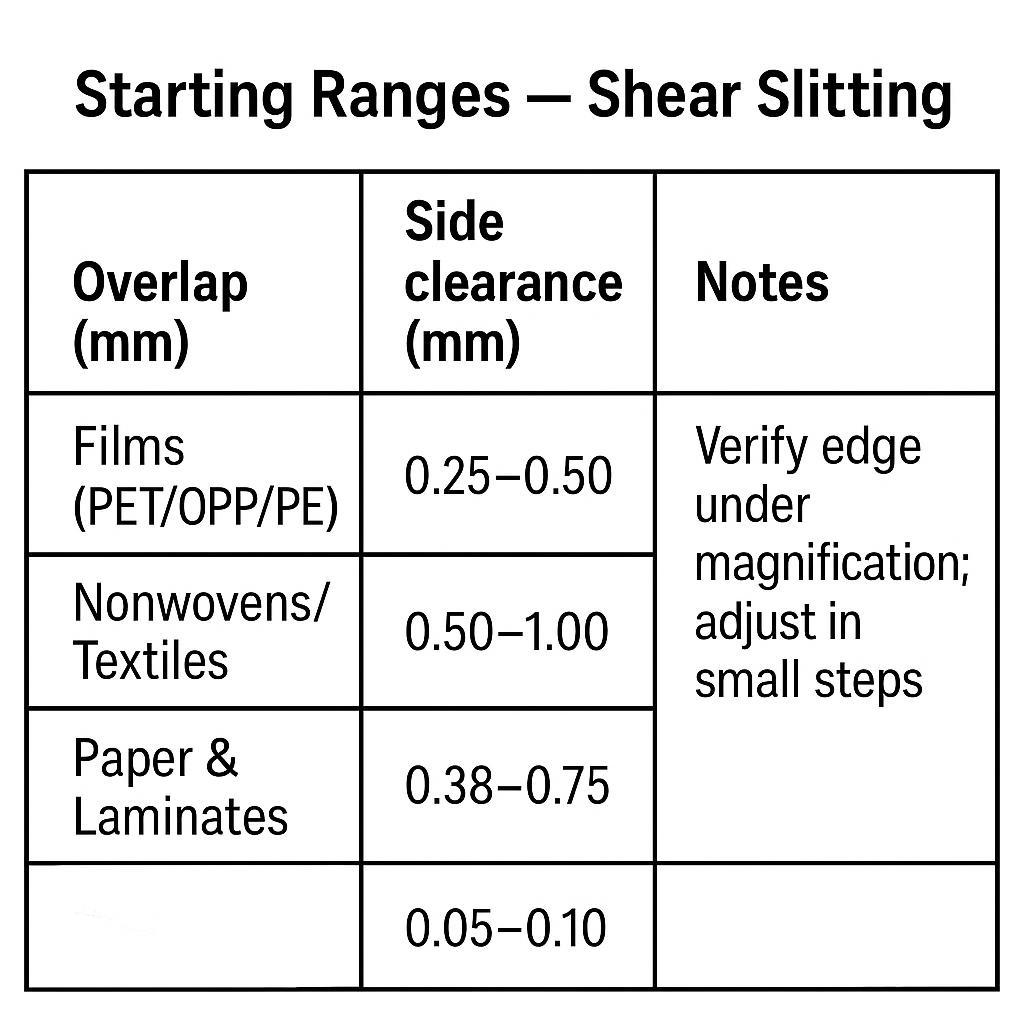
7) What are safe starting settings for overlap and clearance by material?
Use conservative starting ranges, then verify edge quality under magnification and adjust in small steps. As a baseline, films often need lower overlap and tighter control to avoid heat; nonwovens often need sharpness and stability more than force.
8) How do I stop burr problems from coming back after the next changeover?
Document the last-known-good settings (overlap/clearance, tension, speed), add a short startup verification (feeler gauge + IR scan), and log knife life by hours or meters. Repeatability is what protects OEE across shifts.
Jerry Chu is a Technical Support Specialist in MAXTOR METAL’s After-sales Service team with 10 years of cross-industry field experience (paper, plastic recycling/shredding, metal slitting, and wood processing). He supports customers in troubleshooting real-world converting and slitting issues such as edge burrs and excessive dust. Certifications: PMP dan CMRP.

 English
  Spanish
  Italian
  French
  Portuguese
  Russian
  German
  Arabic
  Hindi
Hindi  Vietnamese
  Indonesian
  Japanese
  Korean